
How many hours a week do you spend on work that has nothing to do with product?
I tracked mine. It was twenty. Some weeks, thirty. Sprint reports that take a full day. Feedback scattered across five tools that I had to read, classify, and turn into tickets one by one. Status updates typed from scratch every Monday.
I wasn't a product manager. I was a very expensive data router. Moving information between tools that should have been talking to each other. I spent 170 hours a month on this at my own company before I automated all of it. Both workflows are free, importable as JSON, and run on n8n Cloud's free tier. No infrastructure, no permission from engineering. Today I'll show you how to build them in an afternoon.
The 5 PM Time Sinks (20-30 hours/week)#
Per the Asana Work Index, PMs spend 58% of their time on work about work.
| # | Time Sink | Hours/Week |
|---|---|---|
| 1 | Sprint reports | 8-12/sprint |
| 2 | Classifying feedback | 5-10 |
| 3 | Moving data between tools | 3-5 |
| 4 | Keeping team in sync | 2-4 |
| 5 | Preparing for decisions | 1-2/meeting |
Workflow 1: The Automatable Friday#
Automated sprint report that posts to Slack every Friday at 9am.
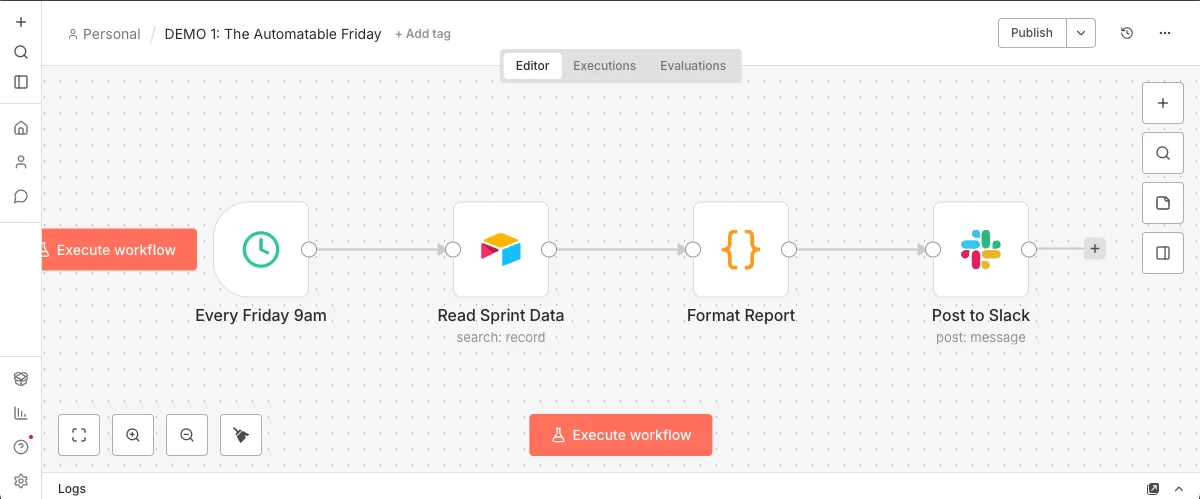
Key nodes:
Schedule Trigger:
Every week, Friday, 9:00 AM
Airtable:
Filter by Sprint = Current, Status = Done
Code node:
Group by assignee, count story points, format as Slack markdown
Slack:
Post to #sprint-updates
There's no AI in Workflow 1. It's pure plumbing.
Four nodes that save you 4-6 hours every sprint. Now imagine what happens when we add intelligence.
Workflow 2: The Intelligent Router#
AI-powered feedback classification that routes bugs, features, and questions to the right Slack channel. One AI node turns a dumb pipe into a smart pipe.

Key nodes:
n8n Form Trigger:
Name, Email, Feedback Text, Product Area
Basic LLM Chain:
Classify feedback using AI
Switch:
Route based on LLM output (BUG / FEATURE / QUESTION)
Slack:
Different channel per category
Airtable:
Log every classified feedback
The Classification Prompt
You are a product feedback classifier for a SaaS company.

Your task: classify the feedback below into exactly ONE category.

Categories:
- BUG — The user reports something broken, crashing, erroring, or not
  working as expected. Look for words like: crash, error, broken, fail,
  wrong, doesn't work, can't.
- FEATURE — The user requests new functionality or an improvement to
  existing features. Look for words like: add, would be nice, wish,
  could you, suggestion, improve.
- QUESTION — The user asks how to do something or needs help
  understanding the product. Look for words like: how do I, where is,
  can I, is it possible, help.

Rules:
- If the feedback contains BOTH a bug and a feature request, classify
  as BUG (broken things take priority).
- If unclear, classify as QUESTION (safest default — a human will review).
- Respond with ONLY the category name in caps. No explanation, no punctuation.

Feedback: {{ $json.Feedback }}
Why this prompt works:
Role
sets context ("product feedback classifier")
Signal words
per category guide the LLM's pattern matching
Tiebreaker rule
handles ambiguous cases (bugs > features > questions)
Safe default
ensures nothing gets lost
Strict output
makes the Switch node reliable
The Ambiguous Test
"It would be really nice if the export could handle more than 100 rows without crashing."
Is this a feature request ("it would be nice") or a bug ("crashing")? The tiebreaker rule in the prompt handles it: if feedback contains both a bug and a feature request, classify as BUG — broken things take priority.
If you disagree with that classification, you change one line of the prompt. Not a model retrain. Not a ticket to data science. One line of text. You wrote acceptance criteria, not code — and that's a product decision, not an engineering decision.
Download Workflow 2 JSONThe Pattern#
Both workflows follow the same structure:
This pattern works for:
Prioritizing support tickets
Routing sales leads
Triaging customer complaints
Classifying NPS responses
Processing form submissions
Want to go deeper into AI Product Management?
What you just read is a fraction of what I cover at Marily Nika's AI PM Bootcamp. The full program takes you from "I want to use AI" to "I'm shipping AI products" — with real projects, not theory. It's where I trained, and I now teach there as a Fellow.
Get Started#
n8n Cloud (14-day free trial) — sign up and start building
Pick your most boring Friday task
Build one workflow this week
What I Learned Automating 170 Hours a Month#
Automate the boring task first.
The flashy use case is tempting. But sprint reports won me 12 hours back every two weeks — more than any clever integration I built.
Your database is the brain.
Don't build a separate "automation database." Jira, Airtable, and Sheets already contain 90% of the data your workflows need.
Automate the trigger, not just the task.
A workflow that runs "when I click a button" saves time. A workflow that runs "when a deal closes" saves time AND removes you from the loop entirely. The second kind is worth 10x more.
Start with one.
I tried to automate everything at once and ended up with 14 half-broken workflows and zero time savings. One workflow running reliably beats five in draft mode.
What did I automate with those 170 hours?
These workflows are a fraction of a larger system: 12 Airtable bases, 50+ automations, and an AI agent handling customers 24/7. All documented in the Business OS case study.
Common Questions#
Can n8n connect to Jira / Salesforce / my tool?
Yes. Over 400 integrations — Jira, Salesforce, Notion, Linear, HubSpot, Zendesk, Google Sheets. If you use it, n8n probably connects to it.
Is n8n free?
Yes, self-hosted is free forever under the Sustainable Use license (open core, no workflow or execution limits). The only thing you pay for is the VPS where you deploy it. The cloud version includes a 14-day free trial without a credit card and plans starting at €24/month. The trial is more than enough for the workflows in this article; for continuous use in an SMB, self-hosted usually pays off from month two.
What LLM should I use for the classifier?
Whatever your company already pays for. The prompt works the same with Claude, GPT-4, or Gemini. The classification pattern doesn't change with the model.
How is this different from Zapier or Make?
Open source, self-hostable, AI nodes built in, and a visual canvas that lets you see the branching logic. Zapier is great for simple triggers. n8n is for when you need branching, AI, loops, and full control.
What if the AI classifies something wrong?
You change the prompt. Add a new signal word, adjust the tiebreaker rule, add a category. You iterate in plain English, not in code. And the Airtable log lets you review and correct.
Can I download the n8n templates from this article?
Yes. Both workflows are available as JSON files you can import directly into n8n Cloud (free tier). Download them from the "Import Workflows" section and they'll be running in 5 minutes.
Import the Workflows#
Download the JSON files and import them directly into your n8n instance:
How to import:
In n8n, click the + button, select "Import from File", and choose the JSON. Then connect your own Slack, Airtable, and AI credentials.